Last Updated on May 2, 2026 by Bruno Bianchi
If you live in Spain, a digital certificate in Spain is one of the most useful tools you can have. It allows you to sign official documents online, apply for or renew visas and residency cards, pay taxes, access your Social Security records, and complete many other legal and administrative tasks without leaving home. In this guide, we’ll walk you through exactly what it is, why it matters, and how to get one.
Why is a Digital Certificate in Spain Important?
A digital certificate is essentially your electronic ID for the Spanish government. It verifies your identity when carrying out online transactions. With it, you can:
Planning your move to Spain?
Get the free step-by-step roadmap used by 10,000+ expats — covering visas, budget, housing, and the mistakes to avoid.
Start the Moving to Spain Hub →- Sign official documents electronically with full legal validity.
- Renew your Spanish residency or visa without visiting an office.
- Access Social Security and healthcare portals (for example, download your “vida laboral”).
- File and pay taxes online through the Agencia Tributaria.
- Register as autónomo (self-employed) and submit quarterly returns.
- Communicate with your local town hall, the immigration office, or even the court system.
- Check fines, census registration, or pay local fees.
Without a digital certificate, many of these tasks require in-person visits, long waits, and extra paperwork.
Types of Digital Certificates in Spain
There are two main options:
- Digital certificate from FNMT (Fábrica Nacional de Moneda y Timbre) – the most common and user-friendly.
- DNI-e (electronic ID card chip) – available for Spanish nationals with a DNI card, but requires a card reader and PIN setup.
Most foreigners in Spain will apply for the FNMT certificate as a “persona física” (natural person).
How to Get a Digital Certificate in Spain: Step by Step
Step 1: Prepare your browser
This step is key. Not all browsers are compatible with the FNMT system.
Not sure which city is right for you?
Compare cost of living, weather, expat community size, and lifestyle across 13 Spanish cities in our free guide.
Explore Cities →- Use Internet Explorer or an older version of Mozilla Firefox for the request.
- Newer versions of Chrome or Edge only work after installation.
Tip: Use the same computer and browser for every step of the process.
Step 2: Request the certificate online
- Go to the official FNMT (Fábrica Nacional de Moneda y Timbre) website.
- Select “Obtener certificado software” (Get a software certificate).
- Select in-person identification
- Enter your details (name, NIE, email address) and request a code.
- You’ll receive a unique code by email. Keep it safe.
Step 3: Verify your identity in person
- With your NIE/TIE card and passport, go to an authorized registration office.
- These offices include Tax Offices (Agencia Tributaria), Social Security offices, and town halls.
- Some offices require a prior appointment — check before you go.
- Show the verification code you received by email.
Step 4: Download the certificate
- After your identity is verified, return to the FNMT website.
- Use the same computer and browser you used for the initial request.
- Enter your code and download the digital certificate file.
Step 5: Install the certificate in your browser
- Open your browser settings and import the certificate.
- Most people use Chrome, Edge, or Firefox.
- Save a backup copy of your certificate to a secure USB or hard drive. This backup will allow you to move the certificate to another device if needed.
Step 6: Use your digital certificate to enter official portals and sign documents
With the certificate installed, you can log into official portals. For example:
- The Agencia Tributaria to file taxes.
- Your local ayuntamiento (town hall) to pay fees or check padrón records.
- The immigration office to manage residency renewals.
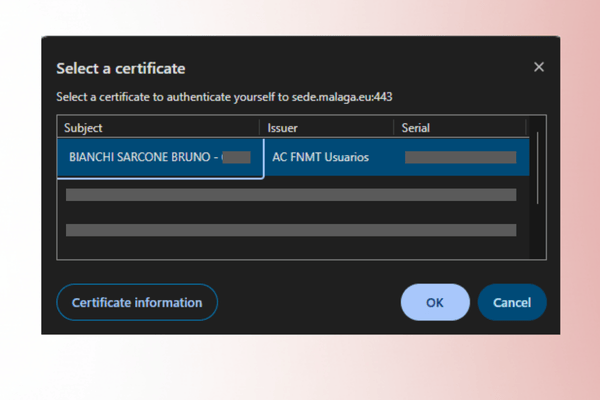
Example: entering Málaga’s city portal using the digital certificate.


Frequently Asked Questions
Can I install the digital certificate on my phone?
Yes. The FNMT offers an Android app where you can request, verify, and install the certificate directly.
What happens if I lose my certificate?
You can revoke it via the FNMT website and request a new one. Always keep a secure backup.
Can non-residents apply for it?
Yes, as long as you have a valid NIE (Número de Identidad de Extranjero).
How long is the certificate valid?
Usually 4 years. You’ll need to renew it afterward.
Is it free?
Yes, applying for the certificate itself is free of charge.
Conclusion
Getting a digital certificate in Spain may seem like a bureaucratic step, but it’s an essential tool that will save you hours of waiting in government offices. From signing legal documents to managing your residency online, it’s the key to unlocking Spain’s digital administration.
Disclaimer: Please note that Spanish administrative rules can change from time to time. The steps above are shared for guidance, but we recommend always checking the official FNMT website or confirming with the authorities to make sure you have the latest information.
Get your free step-by-step Spain move plan
10 emails over 2 weeks covering visas, budget, housing & the mistakes to avoid.
Join 10,000+ expats who used this roadmap.
100% free · No credit card · Unsubscribe anytime